
TL;DR:
- Using an AI platform like BoardMaster allows students to convert lecture notes into targeted board-style questions, flashcards, and mock exams, reducing study time and improving scores. It merges course and board prep into one workflow by aligning practice questions with actual syllabus emphasis and providing analytics to identify weak areas. Starting early and consistently using the integrated system enhances long-term retention and exam performance.
The fastest way to merge course exam prep with USMLE/COMLEX-style board practice is to use an AI platform that converts your lecture notes directly into targeted board-style questions, spaced-repetition flashcards, and timed mock exams. BoardMaster does exactly that, and the results are measurable: one student, Sarah improved significantly in board practice scores while cutting her study hours in half. If you're a med student or instructor trying to stop studying twice, here's what to do right now: upload your lecture notes, generate a board-style question set, and schedule your first spaced-repetition session before the week is out.

Table of Contents
- Why BoardMaster is the best integrated solution for merging course and board prep
- What to look for when choosing tools that merge course exams and board prep
- How to build a daily workflow that merges course and board study
- How instructors can create board-style assessments and cut grading time
- Sample 8–12 week study plan that blends course and board prep
- What the evidence shows about merged prep workflows
- Key Takeaways
- The workflow gap most students never close
- BoardMaster gives you one place to prep for both
- Useful sources
- FAQ
Why BoardMaster is the best integrated solution for merging course and board prep
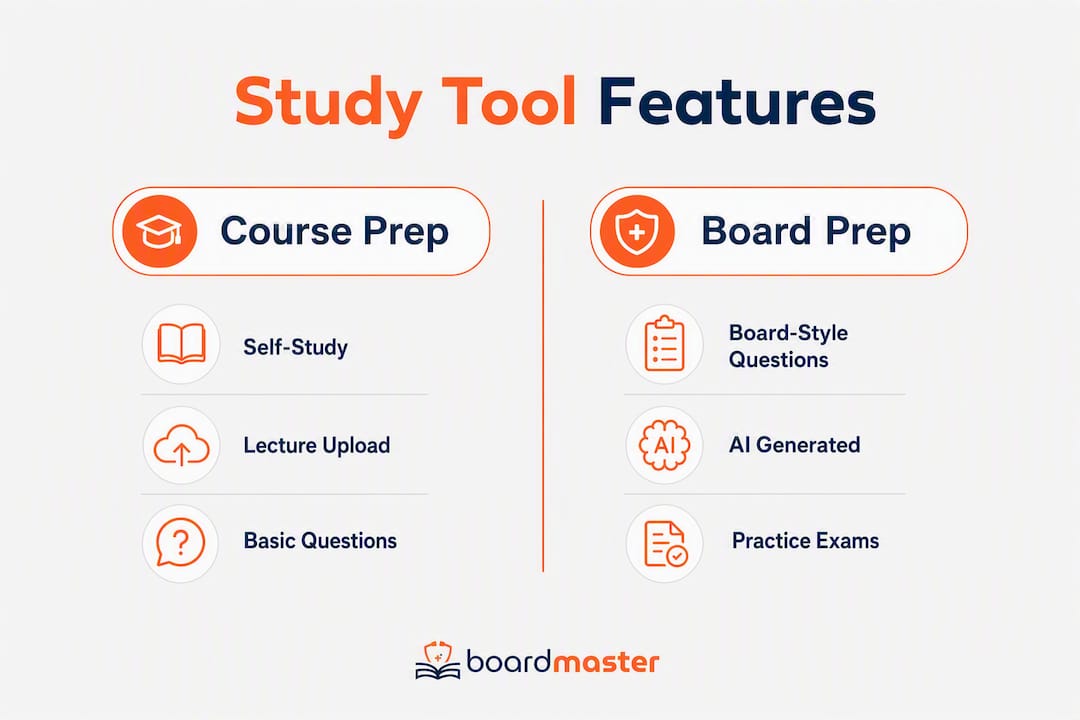
Most med students treat course exams and board prep as two separate jobs. That's the problem. BoardMaster collapses them into one workflow by generating USMLE- and COMLEX-style questions directly from whatever lecture material you upload, so the questions you practice on are already aligned with what your professor emphasized.
The features that matter most for merged prep:
- AI question generation from uploaded lectures — upload a PDF, slide deck, or notes file; BoardMaster drafts board-style vignettes tied to your syllabus content
- Spaced-repetition flashcards with medical images — high-yield cards built from your own material, not a generic deck
- Timed mock exams — full-length, board-format practice sets you can run on demand
- Lecture-to-podcast conversion — 8-minute study podcasts generated from your lectures for mobile review between classes
- AI study assistant — instant explanations when you miss a question, without leaving the platform
- 5,000+ physician-written board-style questions — a curated bank that supplements your lecture-generated sets
- AI-driven OSCE simulations — clinical skills practice for students preparing for practical assessments
For instructors, BoardMaster supports med-school partnerships and cohort-level analytics, so a program can adopt it across a course and track class-wide performance gaps.
Uploading your actual lecture notes and generating questions from them closes the gap between what your professor tests and what the boards test. That alignment is what generic question banks can't replicate.
A free tier is available for students who want to test the workflow before committing to a subscription. The paid plans unlock higher question volume, full mock exam access, and OSCE simulations.
What to look for when choosing tools that merge course exams and board prep
Not every AI study tool is built for the dual-prep problem. When you're evaluating platforms, these are the dimensions that actually separate useful from mediocre.
Feature checklist (prioritized):
- Upload/import formats — does it accept PDFs, PowerPoint decks, Word docs, and image-based slides?
- AI question-generation accuracy — do the generated questions reflect the source material's emphasis, or do they drift toward generic content?
- Spaced-repetition engine — does it schedule reviews based on your actual performance, or just cycle cards randomly?
- USMLE/COMLEX-style mock exams — timed, vignette-format, with answer explanations that teach reasoning
- Analytics and gap reports — can you see which topics you're weak on, broken down by subject or lecture?
- LMS integration — does it connect to Canvas, Blackboard, or Moodle for instructors who need gradebook export?
- Mobile and offline access — can you study on your phone without a Wi-Fi connection?
- Privacy and data handling — is your uploaded content protected under a clear US-compliant data policy?
- Pricing model and total cost — what does the free tier actually unlock, and when does the paid plan become necessary?
- Support and community — is there a help desk, a user forum, or a peer community for troubleshooting?
When evaluating platforms, the medical study tool comparison criteria that matter most for merged prep are question quality, analytics depth, and how closely generated questions track your actual syllabus.
Comparison dimensions at a glance:
| Dimension | What to evaluate |
|---|---|
| Best for | Student self-study vs. instructor-led assessment |
| Core features | Upload/import, AI question generation, spaced repetition, mock exams |
| Pricing model | Free tier limits, subscription cost, credit packs for add-ons |
| USMLE/COMLEX alignment | Vignette format, clinical reasoning, question style |
| Instructor features | Exam builder, auto-grading, LMS integration, roster management |
On free trials: test question quality first, not the feature list. Upload a real lecture and check whether the generated questions match the depth and emphasis of your professor's exams. Then test analytics export and mock exam formatting. If those three pass, the rest of the feature set is secondary.
How to build a daily workflow that merges course and board study
This is a sequenced workflow you can start the same week your term begins.
Set up your course structure (Week 1). Create a folder or course module for each class. Upload your first batch of lecture PDFs or slide decks. Set a target board topic list based on your school's USMLE/COMLEX timeline.
Convert each lecture into a question set (after every class). Upload the day's lecture material and generate a 10–15 question board-style set. Flag any questions that cover concepts your professor stressed heavily.
Build your flashcard deck (same session). Generate spaced-repetition cards from the same upload. Prioritize cards that cover high-yield concepts flagged by the analytics. Tools like Mindgrasp and BoardMaster both support single-upload workflows that produce notes, flashcards, and quizzes simultaneously.
Run a short formative quiz after each lecture (15–20 minutes). Don't wait for the weekend. A quick post-lecture quiz locks in retention and surfaces gaps while the material is fresh.
Weekly cumulative mock set (60–90 minutes, board-style timed format). Pull questions from the week's lectures and run them as a timed block. This trains you to switch between topics under time pressure, which is exactly what the boards demand.
Monthly full-length timed mock exam. Simulate actual board conditions: full-length, timed, no interruptions. Use your analytics afterward to identify the three weakest topic areas and re-sequence the following week's review around them.
Shift intensity at the 8-week mark. For most students, the last 8 weeks before boards should flip the ratio: 60–70% board-focused review, 30–40% course-specific prep. Your analytics data from the prior weeks tells you exactly where to focus.
Time allocation guidance: plan for 2–3 hours of active study per day during term, with roughly 45 minutes dedicated to board-style practice. That ratio keeps course grades intact without letting board prep slip.
Pro Tip: Use the lecture-to-podcast feature for commutes and gym sessions. Passive audio review of your own lecture material adds 30–45 minutes of study time per day without touching your desk schedule.

For a broader look at fitting AI tools into a med-school schedule, the efficient medical studying with AI guide covers scheduling strategies in more detail.
One privacy note: BoardMaster operates under a US-compliant data policy, so uploaded lecture content is protected and not shared with third parties.
How instructors can create board-style assessments and cut grading time
Instructors face a different version of the same problem: how do you write assessments that test course content and prepare students for boards, without spending your weekend grading?
Upload your lecture decks and reading lists. Feed the platform your actual teaching materials. The AI generates formative quiz questions tied to your syllabus, not generic content.
Curate and balance question difficulty. Review the generated questions, adjust difficulty distribution, and add or remove items to match your learning objectives. Aim for a mix of recall, application, and clinical reasoning questions.
Publish as a timed mock exam or LMS quiz. Export the assessment to your LMS or run it directly in the platform. Canvas integration via Learning Tools Interoperability (LTI) is the standard connection method for most US medical schools.
Use auto-grading and answer grouping to speed up marking. Platforms like Gradescope support answer-group formation and retroactive rubric adjustments, which cuts grading time significantly for large cohorts. Export question-level statistics to identify which lecture topics need remediation.
Export grades to your gradebook. Push results directly to Canvas or your institution's LMS. Review item-level analytics to see which questions most students missed, then flag those topics for the next lecture.
Pro Tip: Generate two parallel versions of every exam at the time of creation, not after. This takes seconds with AI question generation and eliminates the scramble when a makeup session is needed. Vary question order and swap two or three items between versions to maintain integrity.
Sample 8–12 week study plan that blends course and board prep
Two variants: an 8-week intensive (for students with a term-end overlap or an approaching board date) and a 12-week moderate (for steady integration from the start of a term).
8-week intensive plan (weeks 1–8):
| Week | Primary activity | Tools/features | Time estimate |
|---|---|---|---|
| 1–2 | Upload all lectures; generate question sets and flashcard decks | AI question generator, spaced-repetition flashcards | multiple hours per day |
| 3–4 | Weekly cumulative mock sets; analytics review | Timed mock exams, gap reports | multiple hours per day |
| 5–6 | Board-focused intensification; OSCE simulations | OSCE practice, physician-written question bank | several hours per day |
| 7 | Full-length timed mock exam; targeted remediation | Full mock exam, AI tutor | several hours per day |
| 8 | Final review of weak topics; podcast review for mobile | Study podcasts, flashcard review | multiple hours per day |
12-week moderate plan: follow the same structure but spread Weeks 1–4 activities across Weeks 1–6, giving you more time per lecture block and a lower daily hour commitment (2–3 hrs/day through Week 8, then multiple hours per day for the final push).
Subscription tier guidance:
- Free tier: validates the upload-to-question workflow; suitable for the first 1–2 weeks of either plan
- Paid subscription: necessary once you need higher question volume, full mock exam access, and OSCE simulations; upgrade before Week 3 of the intensive plan or Week 5 of the moderate plan
For detailed term-by-term planning, the med school exam prep guide covers scheduling tradeoffs in more depth.
Quick checklist for your planner:
- Upload all lecture materials by end of Week 1
- Generate question sets within 24 hours of each lecture
- Run a weekly cumulative mock set every Sunday
- Review analytics every Monday and adjust the week's focus
- Schedule a full-length mock exam at Week 4 and Week 7 (or Week 6 and Week 10 for the 12-week plan)
- Upgrade to a paid tier before high-volume weeks begin
What the evidence shows about merged prep workflows
Sarah's result is the clearest data point available: she moved from the 73rd to the 92nd percentile on her board practice scores while cutting her study hours in half. The behaviors that drove that gain were specific: she uploaded each lecture the same day it was delivered, generated a question set immediately, and ran weekly cumulative mock sets in timed board format. She didn't study more; she studied from the right material.
AI-powered study tools that generate practice questions from a student's own course content consistently outperform generic question banks for course-aligned retention, because the questions reflect what the instructor actually emphasized. That alignment is the mechanism behind Sarah's improvement.
The gap between course exam performance and board exam performance usually isn't a knowledge gap. It's a translation gap — students know the material but haven't practiced applying it in board-style clinical reasoning formats. Generating board-style questions from lecture notes closes that gap at the source.
A note on variance: Sarah's result reflects a student who used the workflow consistently and started early in the term. Students who begin the integrated workflow in the final two weeks before boards see smaller gains. The earlier you start, the more the spaced-repetition engine has to work with.
Key Takeaways
The most effective approach to merging course and board exam prep is an AI-driven workflow that converts lecture notes into board-style questions, spaced-repetition flashcards, and timed mock exams from day one of the term.
| Point | Details |
|---|---|
| Start with your lectures | Upload lecture PDFs or slide decks immediately; generate board-style questions the same day. |
| Use spaced repetition consistently | Schedule flashcard reviews based on performance data, not a fixed calendar. |
| Run weekly timed mock sets | Cumulative board-format practice each week builds clinical reasoning under time pressure. |
| Upgrade before high-volume weeks | The free tier validates the workflow; a paid subscription is necessary for full mock exams and OSCE access. |
| BoardMaster as the integrated option | BoardMaster generates USMLE/COMLEX-style questions from your own lectures, with flashcards, mock exams, and OSCE simulations in one platform. |
The workflow gap most students never close
The conventional wisdom in med school is to separate course prep from board prep: grind your class material until the shelf exam, then pivot to a question bank for dedicated board study. That model made sense when the only question banks were static and generic. It doesn't hold anymore.
The real problem isn't time. Most students who struggle with boards aren't studying too little; they're studying the wrong way twice. They memorize for the course exam in a format that doesn't transfer to clinical reasoning, then start over with a question bank that has no connection to what they actually learned in class. Two separate study systems, neither reinforcing the other.
What actually works is treating every lecture as a board-prep opportunity from Week 1. The moment you upload a lecture and generate a vignette-style question from it, you're practicing clinical reasoning on material you already partially know. That's not just efficient; it's how long-term retention actually forms. Spaced repetition on your own lecture content, in board format, is a fundamentally different cognitive exercise than re-reading notes or passively watching review videos.
The tools that support this workflow, BoardMaster chief among them, aren't shortcuts. They're a structural fix to a study system that was never designed to serve both goals at once. The students who use them well don't just score higher; they report studying fewer hours because they're not duplicating effort across two disconnected systems.
BoardMaster gives you one place to prep for both
If you've been running two separate study systems, one for your course exams and one for boards, BoardMaster is built to replace both. Upload your lecture notes and get USMLE- and COMLEX-style questions generated from your actual syllabus, not a generic bank. Add spaced-repetition flashcards, timed mock exams, OSCE simulations, and lecture-to-podcast conversion, and you have a complete prep system that runs on your own course material.
The free tier lets you test the core workflow today: upload a lecture, generate a question set, and see whether the questions match what your professor emphasizes. When you're ready to scale up, the paid subscription unlocks full mock exams, higher question volume, and OSCE practice. Instructors and program leads can explore med-school partnership options for cohort-wide adoption and analytics. To see the question generator in action before signing up, the AI question generator demo shows real-time question drafting from an uploaded lecture.
Useful sources
The following resources were used in building this article. Product pages describe features and pricing; educator resources describe methods and best practices.
- BoardMaster — USMLE & COMLEX Prep (product page) — primary source for BoardMaster features, pricing, and free tier details
- BoardMaster Med School Partnerships (product page) — instructor and program onboarding information
- BoardMaster AI Study Podcasts (product page) — lecture-to-podcast feature details
- Mindgrasp (product page) — AI study tool supporting single-upload note, flashcard, and quiz generation
- Gradescope (product page) — instructor grading and analytics platform with LMS integration
- Quizgecko (product page) — AI quiz, flashcard, and podcast generation with analytics and difficulty control
- MoreExams (product page) — free-tier AI exam generation tool; useful for validating upload-to-question workflows
- Penn CETLI — Online Assessment Tools (educator resource) — authoritative overview of LMS-based assessment options used at US institutions
- AI in Exam Prep for CCRN Success (educator resource) — evidence-based discussion of AI-driven practice in high-stakes medical certification prep
- Learning Tools Interoperability — Wikipedia (reference) — background on LTI, the standard protocol for LMS integration
FAQ
What are the most effective study techniques for merging course and board exams?
Active recall and spaced repetition applied to your own lecture material are the highest-yield techniques. Generating board-style questions from each lecture immediately after class, then reviewing them on a spaced schedule, trains both course retention and clinical reasoning simultaneously.
What is the best tool for combined course and board exam revision?
BoardMaster is the most integrated option for US med students: it generates USMLE- and COMLEX-style questions directly from uploaded lecture notes, adds spaced-repetition flashcards, timed mock exams, and OSCE simulations in one platform.
What should I test during a free trial of an exam prep tool?
Upload a real lecture and check whether the generated questions reflect your professor's emphasis, not generic content. Then test the analytics export and mock exam format. If those three pass, the rest of the feature set follows.
How do I protect my data when uploading lecture notes to an AI platform?
Check that the platform operates under a US-compliant data policy and does not share uploaded content with third parties. BoardMaster's data handling policy covers uploaded lecture material under its US-compliant privacy terms.
How many hours per week does a merged prep workflow realistically take?
Plan for 2–3 hours of active study per day during term, with roughly 45 minutes of that time dedicated to board-style practice. The integrated workflow reduces total hours compared to running two separate study systems because you're not duplicating effort.