
Convert notes to study-ready flashcards in three steps: paste, upload, or scan your material, run an AI generation pass, then edit before you study. The generation itself takes seconds. Expect to spend more time editing than creating, since a quick review pass catches errors and turns generic answers into ones that actually match your exam. Once the deck is clean, export it into a spaced repetition system like Anki or Quizlet and let the scheduling do the rest.
TL;DR:
- Generating more than 60 cards from a few pages of notes indicates over-splitting, requiring careful trimming to avoid overwhelming review sessions.
- Use clean, explicit definitions and short bullet points in notes to produce precise question and answer flashcards, especially for clinical details.
- Upload notes as cleanly formatted text or structured PDFs and shoot photos in even lighting to minimize OCR errors and improve accuracy.
- Focus on editing and rewriting harder answers in your own words rather than relying solely on AI drafts to improve retention and understanding.
- Match card types—basic, cloze, image, or multi-step—to the content and confirm export formats preserve all media and annotations for effective study.
Table of Contents
- How Do You Actually Turn Notes to Flashcards?
- What Makes AI-Generated Flashcards Accurate?
- Why the Edit Pass Matters More Than the Generation
- Which Flashcard Format Fits Which Kind of Content?
- How Should You Study the Decks Once They're Built?
- BoardMaster's Take on Notes-to-Flashcards for Med Students
- An Editor's Rules for Trusting AI-Generated Cards
- When a Med-Focused Tool Beats a General Flashcard Generator
- Sources
- FAQ
How Do You Actually Turn Notes to Flashcards?
The workflow only has four moving parts, but the order matters according to best AI tools for course creators. Skip the edit step and you end up memorizing wrong answers with total confidence, which is worse than not studying at all.
- Pick your input format. Pasted text works best because the AI has clean, structured content to parse. A PDF or DOCX upload is the next best option. A photo of handwritten notes works too, but expect more cleanup afterward.
- Run the generation pass. Most tools that accept typed text, PDFs, and photos through OCR will return a full draft deck in well under a minute.
- Check card density. A dense page of notes typically produces 5 to 10 flashcards, so a five-page handout might generate 25 to 40 cards. If your deck comes back with 80 cards from three pages, the tool is over-splitting minor details, and you should trim before you study.
- Edit, then export to your study app.
Before you upload anything, do a 30-second pass over your notes: delete stray doodles, spell out abbreviations you invented at 11 p.m., and make sure headers actually describe the content below them. Messy input produces messy cards, and cleanup after generation always takes longer than cleanup before it.
What Makes AI-Generated Flashcards Accurate?
Clean structure in, clean cards out. Notes written as explicit definitions and short bullet points translate into sharp question-and-answer pairs. Notes written as dense paragraphs of stream-of-consciousness thinking translate into vague, bloated cards that test recognition instead of recall.
A few habits make a measurable difference:
- Write definitions as complete statements ("Mitral stenosis restricts blood flow from left atrium to left ventricle") rather than fragments.
- Spell out your own shorthand once at the top of the page, or the AI will guess and sometimes guess wrong.
- For handwritten pages, shoot photos in even lighting with the page flat, since shadows and skewed angles are the top cause of OCR errors.
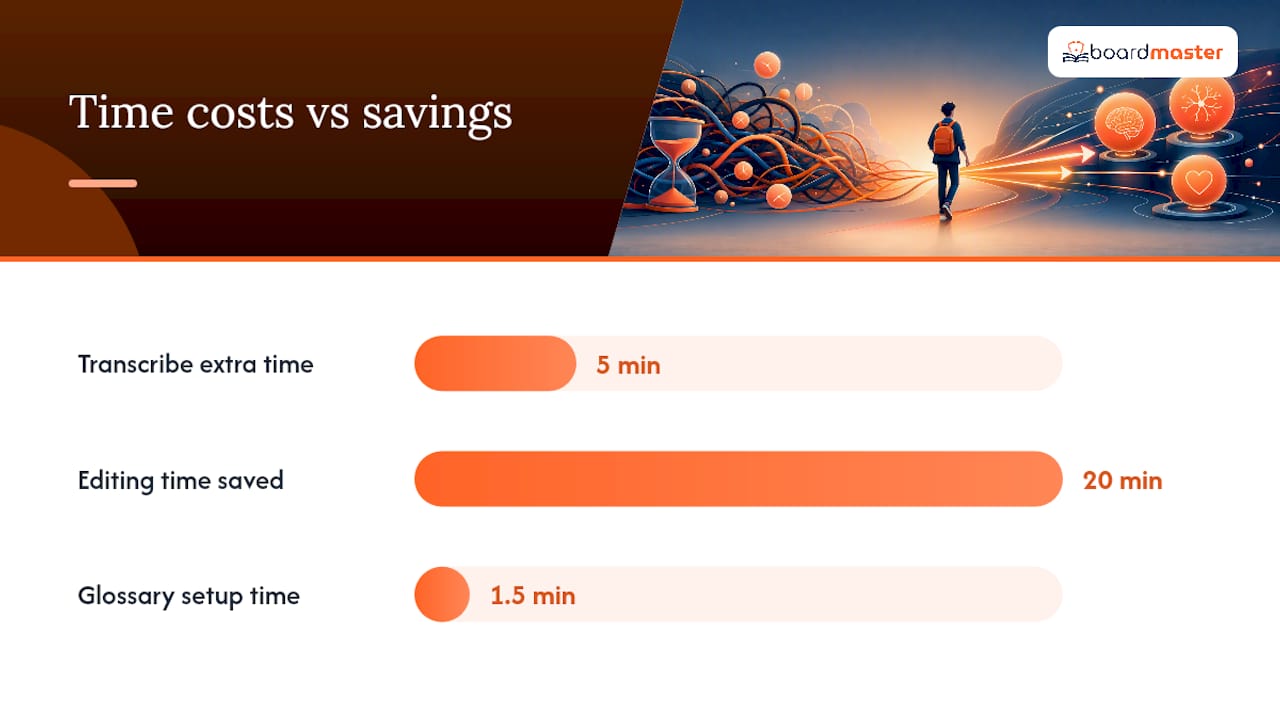
- Transcribe instead of photographing when your handwriting is genuinely rough. It costs five extra minutes and saves twenty in editing.
- For diagrams, formulas, and tables, split them into separate single-fact cards rather than one card asking you to reproduce an entire chart from memory.
Pro Tip: Keep a running one-line glossary at the top of any note file with heavy abbreviations. It takes 90 seconds and noticeably cuts the number of garbled cards you'll need to fix later.
Why the Edit Pass Matters More Than the Generation
Generate-then-edit isn't a suggestion, it's the whole point of the workflow. AI drafts flashcards fast, but treating the output as a first draft rather than a finished deck is what actually prevents you from studying wrong information. The generation step saves you the grunt work of transcription. The editing step is where the real learning happens, because rewriting an answer in your own words forces a second pass through the material.
Run every new deck through this checklist before you study it:
- One concept per card. Split any card asking two questions at once.
- Rewrite at least the harder answers in your own words instead of leaving the AI's phrasing.
- Merge near-duplicate cards that test the same fact from slightly different angles.
- Double-check any clinical specifics: doses, units, sequencing, contraindications.
That density guideline from earlier cuts both ways here: a page that generates 25 to 40 cards from five pages of notes is a reasonable starting point, but the number that matters isn't how many cards you generated. It's how many survive your edit pass without changes. If you're editing almost every card, the input notes probably needed more structure going in.
Good tools preserve a citation back to the source line in your notes for each generated card, so when something looks off, you can check the original context in seconds instead of hunting through the whole document.
Which Flashcard Format Fits Which Kind of Content?
Not every fact belongs in the same card shape. Matching format to content type is what separates a deck that tests real recall from one that just tests recognition.
- Basic question and answer works for discrete facts: a definition, a date, a single mechanism.
- Cloze deletion (fill-in-the-blank inside a full sentence) is better for facts embedded in context, since it forces you to recall the missing piece rather than just picking an answer.
- Image-backed cards matter for anything visual: anatomy, histology slides, circuit diagrams, graphs. Evernote's AI Study Card Maker supports this card type along with cloze deletions and source citations tied to each card.
- Multi-step cards suit processes and algorithms, where the sequence of steps matters as much as the individual facts.
Once your deck is edited, export format decides where you can study it. Anki .apkg files, CSV files for Quizlet, and printable PDFs cover most study apps students already use. Confirm your tool preserves images and audio on export, since some conversions flatten multimedia cards into plain text and quietly strip the diagram you spent time adding.
How Should You Study the Decks Once They're Built?
A freshly generated deck is only useful once it enters a review schedule. Spaced repetition systems, whether built on the FSRS algorithm or an older SM2-style model, space out review intervals so you see a card right before you'd otherwise forget it.
- Import the new deck and do a same-day first pass while the material is fresh.
- Let the SRS scheduler push cards into your daily queue; most students see 20 to 40 reviews land per day once a deck stabilizes.
- Cap new cards per day (10 to 20 is reasonable) so a big new deck doesn't swamp your existing review queue.
- Set a weekly 15-minute maintenance slot to prune duplicates, merge overlapping cards, and delete anything that turned out to be too easy to bother reviewing.
Pro Tip: Add new decks in the evening, not the morning. You get one exposure before bed and another the next day, which mimics the spacing effect better than cramming a new deck all in one sitting.
BoardMaster's Take on Notes-to-Flashcards for Med Students
Medical coursework raises the stakes on all of this. A missed nuance in a pharmacology card isn't just a lost study point, it's a wrong answer on a board exam question years later. BoardMaster's flashcard generator is built around that reality: upload lecture material and it can produce hundreds of cards in seconds, tied to spaced repetition and, where relevant, medical images.
The gains publisher case data cites, including one student's significant percentile improvement while cutting study hours, don't come from generation speed alone. They come from pairing fast drafting with the verification habits covered above and a review schedule that actually gets used. For clinical content specifically, always confirm dosages, sequencing steps, and contraindications against your course material before trusting a card, since a generated answer that's 90% right on a drug interaction is still a card you shouldn't study from unchecked.
An Editor's Rules for Trusting AI-Generated Cards
Three rules keep this workflow honest. First, never study a card you haven't read at least once during editing. Second, if a card's phrasing sounds like it came from nowhere in your actual notes, check the source line before you trust it. Third, treat any numeric or clinical detail as unverified until you've cross-checked it yourself.
The most common mistake is treating volume as progress: generating 200 cards feels productive, but 60 well-edited cards will teach you more before an exam. Build the generate-then-edit pass into a weekly habit rather than a one-time event, and the decks stay accurate as your course material grows.
— Dr. Ahmed Abuzoor
When a Med-Focused Tool Beats a General Flashcard Generator
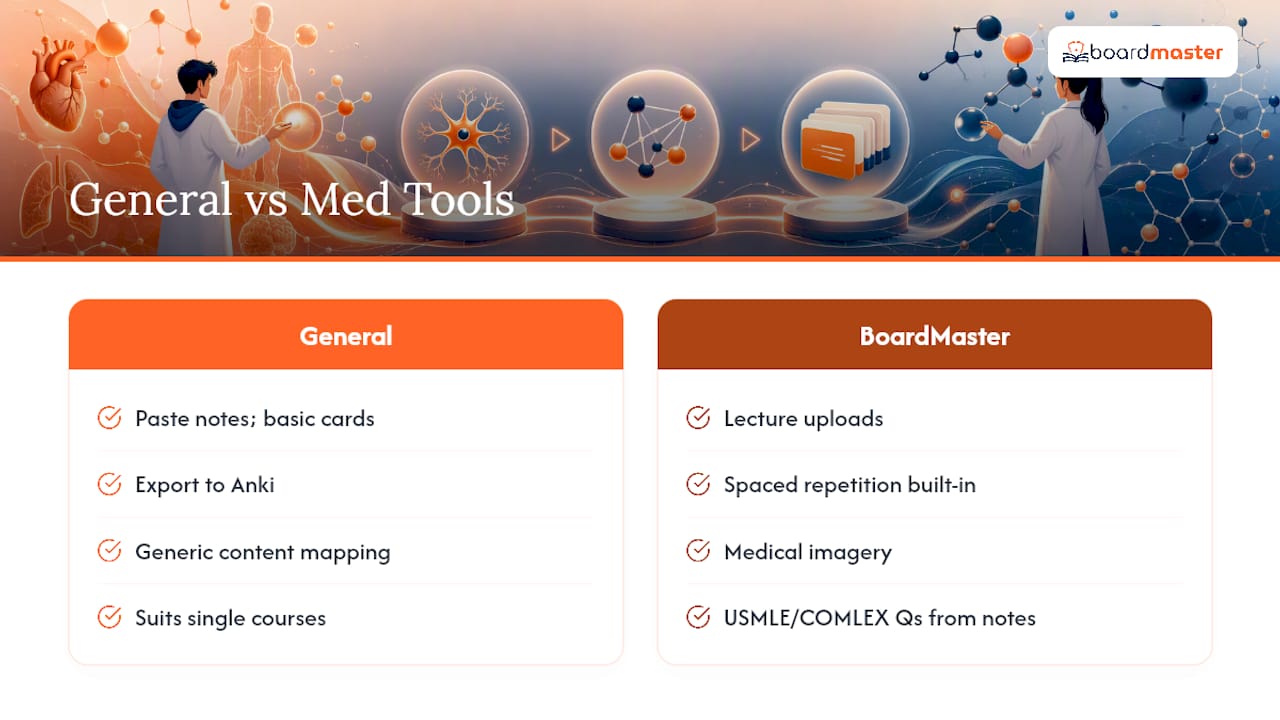
General-purpose flashcard generators handle the basics well: paste notes, get cards, export to Anki. For most undergraduate courses, that's plenty. Medical coursework is different, because the material stacks on itself all the way to boards, and a generic tool has no sense of which concepts your specific professor is going to test.
BoardMaster was built specifically for that gap. It generates flashcards from your lecture uploads with spaced repetition and medical imagery built in, and pairs that with USMLE and COMLEX-style practice questions drawn from the same material, so your class-exam prep and board prep pull from one source instead of two disconnected systems.
If you're weighing whether a specialized tool is worth it versus sticking with a general converter, the honest answer depends on your course load: a single elective probably doesn't need it, but a full med school curriculum where every lecture eventually resurfaces on boards usually does. Programs interested in classroom-wide access can check BoardMaster's partnership options to see what a curriculum-aligned rollout looks like for a cohort rather than one student at a time.
This article is general information, not a substitute for advice from a qualified doctor. Consult a qualified healthcare professional about your own circumstances before acting on anything here.
Sources
- Convert notes to flashcards | Evernote
- AI Notes to Flashcards Generator | Scholarly
- Notes to Flashcards — Deckbase
FAQ
How can I turn my notes into a study guide?
Group related flashcards by topic or lecture, then read through them once as a linear summary before starting spaced repetition review. The editing pass you already did while checking cards doubles as a first study-guide draft.
Can GoodNotes turn notes into flashcards?
Note-taking apps like GoodNotes focus on writing and annotation rather than automatic flashcard generation, so you'd typically export your notes and run them through a dedicated notes-to-flashcards tool instead.
Can Quizlet turn my notes into flashcards?
Quizlet supports manual card creation and importing pre-made decks, including CSV files exported from other flashcard generators, but the heavy lifting of parsing raw notes into cards is usually done by a separate AI generation tool first.
What app can I use to take notes and create flashcards?
Most students use one app for note-taking and a separate AI tool for flashcard generation, then export the results into a spaced repetition app for review. For medical students specifically, some platforms combine lecture upload, flashcard generation, and SRS review in one platform aligned to course and board content.
How many flashcards should one page of notes produce?
A dense page typically generates 5 to 10 cards, meaning a five-page document usually lands in the 25 to 40 card range before editing trims duplicates.