
Lecture-based question generation converts your professor's emphasized lecture notes into NBME-style clinical vignettes you can practice immediately, targeting exactly the content your exam will test. A student survey found that roughly 82–83% of medical students rely on lectures and online resources as their primary study material, yet most generic question banks never touch what your professor actually stressed. This feature closes that gap.
- Output format: NBME-aligned, one-best-answer clinical vignettes with a patient vignette stem, focused lead-in, five homogeneous distractors, and a cited answer rationale.
- Starter workflow: Upload lecture notes or slides → generate a question set → do a quick human edit → practice and track errors.
Pro Tip: Never skip the human review step. A UNMC pilot showed that faculty review and prompt standardization measurably improved question quality and correlated with higher exam scores. BoardMaster builds this review loop into its workflow.
Key Takeaways
Lecture-based question generation produces NBME-aligned clinical vignettes from your professor's content, but human review and a structured prompt are what separate usable items from noise.
| Point | Details |
|---|---|
| Core workflow | Upload lecture → generate → edit against NBME rules → tag → practice → track errors. |
| NBME item rules | Vignette stem, focused lead-in, cover-the-options rule, homogeneous distractors, no cueing language. |
| Time savings are real | A 2026 RCT found AI-assisted item writing takes roughly 4.2 min per item vs. 19.6 min manually. |
| Human review is required | Faculty review and prompt standardization improve quality; skip it only for low-stakes formative use. |
| BoardMaster | Automates the full lecture-to-question pipeline with built-in tagging, export, and a free tier to start. |
Table of Contents
- How lecture notes become board-style vignettes
- What NBME item-writing rules actually require
- A repeatable workflow for generating and using lecture questions
- How to write a prompt that produces usable vignettes
- How to vet AI-generated items before you study from them
- Fitting lecture questions into your USMLE/COMLEX study plan
- Limitations and ethical considerations you need to know
- Sarah's results: what a targeted workflow actually produces
- The part most students get wrong about AI-generated questions
- BoardMaster turns this workflow into a one-click process
- Sources
- FAQ
How lecture notes become board-style vignettes
The transformation from a PDF slide deck to a usable NBME-style item happens in four stages. First, the system ingests your upload (PDF, PowerPoint, or OCR-processed image) and extracts the high-yield segments: bolded terms, numbered lists, emphasized thresholds, and clinical decision points your professor flagged. Second, a large language model (LLM) receives a structured prompt that specifies role, audience, vignette format, difficulty, and jurisdiction (USMLE or COMLEX). Third, the model constructs a clinical scenario around the extracted concept, adds patient demographics, history, physical exam findings, and lab values, then writes a focused lead-in question. Finally, it generates four plausible distractors and a rationale with references.
The underlying technology is a transformer-based LLM, the same class of model behind GPT-4. That power comes with a real constraint: LLMs hallucinate. They can invent a lab value, misattribute a guideline, or cite a paper that does not exist. Human review is not optional; it is the quality gate. For more on how AI builds these items, see how AI generates medical questions.
| Input | Intermediate step | Output |
|---|---|---|
| Lecture PDF / slides | High-yield segment extraction | Identified concepts and thresholds |
| Extracted concepts | LLM prompt with vignette template | Draft clinical vignette + lead-in |
| Draft vignette | Distractor generation | Five homogeneous answer options |
| Full draft item | Human review and edit | Vetted, NBME-aligned MCQ with rationale |
What NBME item-writing rules actually require
Every generated question must satisfy the NBME Item-Writing Guide conventions before you trust it for study. These are not suggestions; they are the psychometric standards your actual exam uses.
The core rules:
- Vignette-first stem: Present a patient scenario with enough interpretive data (age, sex, history, exam, labs) before asking anything.
- Focused, closed lead-in: The question should name one specific task: "What is the most likely diagnosis?" or "What is the next best step in management?" Open-ended lead-ins like "What do you know about this condition?" fail the standard.
- Cover-the-options rule: A knowledgeable student should be able to answer the lead-in correctly before reading the options. If the vignette only makes sense after you see the choices, the stem is too thin.
- Homogeneous distractors: All five options must compete on the same decision dimension. Mixing a drug name, a procedure, a lab test, and a diagnosis in one option set is a classic flaw.
- No cueing language: Avoid "always," "never," "the best," or grammatical hints that point to the correct answer.
For a deeper look at clinical vignette structure, the NBME guide is the authoritative reference.
Pro Tip: Write the distractors before you finalize the stem. If you cannot generate four clinically plausible wrong answers that compete on the same axis, the concept is probably not testable as a one-best-answer item.
A repeatable workflow for generating and using lecture questions
Student workflow (per lecture session):
- Select one lecture and mark the 5–10 highest-yield concepts.
- Run generation with a standardized prompt (see Section 5).
- Edit each item: check the lead-in, remove cueing words, verify clinical facts.
- Tag each question to its lecture timestamp and learning objective.
- Practice the set in timed mode.
- Log errors and flag the source slide for review.
Faculty/educator loop:
- Batch-generate a question set from a lecture module.
- Standardize the prompt template across the course.
- Faculty review each item for accuracy, difficulty, and blueprint alignment.
- Tag items by organ system, topic, and difficulty level.
- Import the vetted set into the course question bank or export to Anki.
A 2026 RCT published in BMC Medical Education found LLM-assisted MCQ development took roughly 4.2 minutes per item versus 19.6 minutes for student authors, a 5.6-fold reduction. That time savings is real, but the psychometric differences between AI and human items were small rather than zero, which is why the edit step in Step 3 above is non-negotiable for anything beyond low-stakes formative practice.
Quick session checklist:
- Lecture selected and high-yield segments marked
- Prompt template filled in (role, audience, difficulty, jurisdiction)
- Items generated and saved
- Each item reviewed against NBME rules
- Items tagged and imported to practice queue
How to write a prompt that produces usable vignettes
A PLOS Digital Health study on GPT-4 question generation showed that a structured, multi-part prompt dramatically improves clinical reasoning quality compared to a bare instruction. Here is a modular template you can paste and adapt:
Role: You are a medical educator writing USMLE Step 1/Step 2 CK practice questions. Audience: Second-year medical students. Objective: Generate one NBME-style, one-best-answer clinical vignette testing [concept from lecture]. Source text: [Paste the relevant lecture segment here.] Vignette structure: Include patient age, sex, chief complaint, relevant history, physical exam, and lab values. Write a focused lead-in question. Provide five homogeneous answer options. Label the correct answer and write a 3–5 sentence rationale citing an open-access reference. Difficulty: [Easy / Medium / Hard] Jurisdiction: USMLE Step [1/2/3] or COMLEX Level [1/2].
To iterate, change one variable at a time: swap "most likely diagnosis" for "next best step in management," increase difficulty, or specify SI lab units versus conventional units. Each change produces a meaningfully different item from the same lecture segment.
Pro Tip: Add the lecture timestamp and learning objective tag directly inside the prompt (e.g., "Tag this item: Cardiology, Lecture 4, Slide 22, LO: Identify causes of secondary hypertension"). The model will include it in the output, saving you tagging time later.
How to vet AI-generated items before you study from them
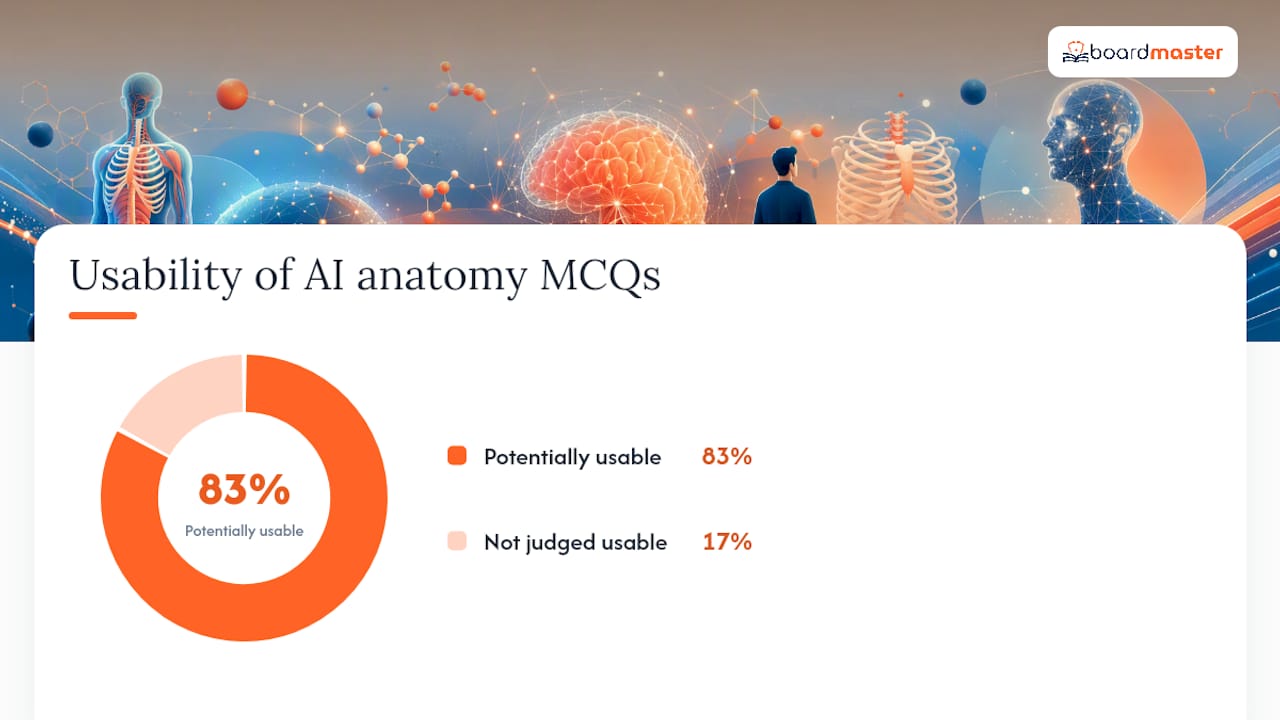
A curriculum-aligned AI system produced 100 anatomy MCQs and subject experts judged 83% potentially usable, many with minimal edits.
Editing checklist:
- Read the lead-in and answer it without looking at the options. If you cannot, the stem is too vague.
- Check every distractor: are all five options the same type (all diagnoses, all drugs, all next steps)?
- Verify the clinical fact in the rationale against a primary source (UpToDate, a guideline, or a textbook).
- Confirm lab values use the correct units and reference ranges for the jurisdiction.
- Remove any cueing words in the stem or options.
- Check the cited reference actually exists.
Red flags requiring full faculty revision:
- The rationale cites a journal article you cannot find.
- Two distractors are essentially synonyms.
- The correct answer is the only option longer than the others.
- The vignette contains a demographic detail irrelevant to the diagnosis (potential bias).
Tag each passing item with difficulty (easy/medium/hard) and blueprint topic before importing it to your practice queue.
Fitting lecture questions into your USMLE/COMLEX study plan
Generated questions work best as active recall tools, not passive reading. After each lecture, run the set the same day while the content is fresh, then repeat the missed items 48 hours later using spaced repetition. A student survey found 68.3% of students already use Anki, so exporting lecture-derived items directly into Anki decks slots into a workflow most students already have.
Practical integration moves:
- Export vetted items to Anki or a local question bank for spaced review.
- Run timed 40-question blocks modeled on NBME format once you have enough items per organ system.
- When you miss an item, the timestamp tag sends you back to the exact slide, not the whole lecture.
Pro Tip: Balance AI-generated items with a main vetted question bank. Practicing only your own generated items can create pattern familiarity with your own prompting style, which does not translate to the real exam's phrasing.
Limitations and ethical considerations you need to know
LLMs are fast, but they fail in predictable ways. Hallucinated facts are the most dangerous: a model can confidently state the wrong first-line drug or invent a sensitivity percentage. Difficulty is also inconsistent across bulk runs, and distractor quality tends to drift downward after the first 10–15 items in a single session.

Privacy matters too. Avoid uploading slides that contain identifiable student data; FERPA prohibits sharing student education records without consent. Third-party copyrighted slides (publisher textbook images, licensed figures) carry separate copyright risk when uploaded to external platforms.
Ethical guidelines:
- Disclose to learners that questions were AI-generated.
- Reserve AI items for formative, low-stakes practice unless a faculty member has validated them psychometrically.
- Keep faculty oversight on every item set used for graded assessment.
Pro Tip: Link every answer rationale to a citable open-access reference in the prompt itself. This forces the model to ground its explanation and makes fact-checking faster for reviewers.
Sarah's results: what a targeted workflow actually produces
Sarah entered her second year at the 73rd percentile on practice exams, studying roughly 10 hours a day across generic question banks and lecture recordings. She switched to a lecture-targeted workflow using BoardMaster: uploading each week's lectures, generating a focused question set, editing the items against NBME rules, and practicing them the same evening. Within one semester, she reached the 92nd percentile while cutting her daily study time roughly in half.
Lessons from her approach you can copy:
- She generated questions per lecture, not per organ system block, keeping the content hyper-specific to what her professors emphasized.
- Every missed item sent her back to the tagged slide, not to a chapter review.
- She ran a weekly timed block mixing her generated items with physician-written questions to maintain exposure to varied phrasing.
The part most students get wrong about AI-generated questions
The common mistake is treating AI generation as a content shortcut rather than a study design tool. Students generate 50 questions, skim the rationales, and call it a study session. That is passive reading with extra steps.
The students who see real gains use generated questions to force retrieval, then trace every error back to its source slide. The question is the trigger; the lecture is the answer. Standardize your prompts early, insist on at least a quick personal review of every item, and track your item-level error rate over time. That error rate, not the number of questions generated, is the metric that tells you whether the workflow is working.
BoardMaster turns this workflow into a one-click process
Generating, editing, tagging, and exporting lecture-based questions manually takes discipline. BoardMaster automates the heavy lifting so you spend time studying, not building infrastructure.
Upload your lecture notes and BoardMaster's AI produces NBME-aligned clinical vignettes tied to your professor's emphasized content, with built-in tagging to lecture timestamps, export to Anki or timed exam mode, and a faculty review workflow for institutional use. The free tier lets you test the pipeline on a real lecture before committing. For students balancing class exams and board prep simultaneously, the lecture-to-question demo shows exactly how a slide deck becomes a practice set in minutes. When you want to supplement with vetted physician-written content, BoardMaster's 5,000+ board-style question bank is built into the same platform. Start with one lecture, generate five items, edit them against the NBME checklist above, and run them tonight.
Sources
- ITEM-WRITING GUIDE
- Using ChatGPT-Generated Practice Exam Questions in Medical Education
- GPT-4 question-generation study (prompt framework and evaluation)
- GenAI and Faculty Collaboration Support Feasible Development of Curriculum-Aligned Open-Access Board-Style Questions | Medical Science Educator
- Student resource usage survey (PMC10807313)
FAQ
What does lecture-based question generation actually produce?
It produces NBME-style, one-best-answer clinical vignettes built from the concepts your professor emphasized, each with a patient stem, focused lead-in, five homogeneous distractors, and a cited rationale.
How long does it take to generate a question set from one lecture?
A 2026 RCT found AI-assisted item creation averages roughly 4.2 minutes per item, compared to 19.6 minutes for student-authored items, so a 10-question set from a single lecture takes under an hour including a quick edit pass.
Do AI-generated questions meet NBME psychometric standards?
Not automatically. The same RCT found small but present differences in discrimination indices between AI and human items, so generated questions are best used for formative practice unless a faculty member has validated them for graded use.
Can I use BoardMaster to generate questions from my own lecture notes?
Yes. BoardMaster lets you upload lecture slides or notes and generates NBME-aligned vignettes tied to your professor's emphasized content, with tagging, export to Anki, and a free tier to test the workflow before subscribing.
What is the biggest risk of relying on AI-generated questions?
Hallucination: the model can state an incorrect drug dose, invent a lab value, or cite a nonexistent reference with full confidence. Always verify the clinical fact in the rationale against a primary source before studying from it.
Recommended
- Tailored USMLE Question Generation Explained for Med Students | BoardMaster Blog
- How AI Generates Medical Questions for Med Students | BoardMaster Blog
- UWorld vs BoardMaster: Choose the Best USMLE Question Bank | BoardMaster Blog
- USMLE-Style Question Format: A 2026 Medical Student Guide | BoardMaster Blog